
Why Your AI Character Looks Different in Every Image
By Zechariah Myrick · September 18, 2026 · 7 min read
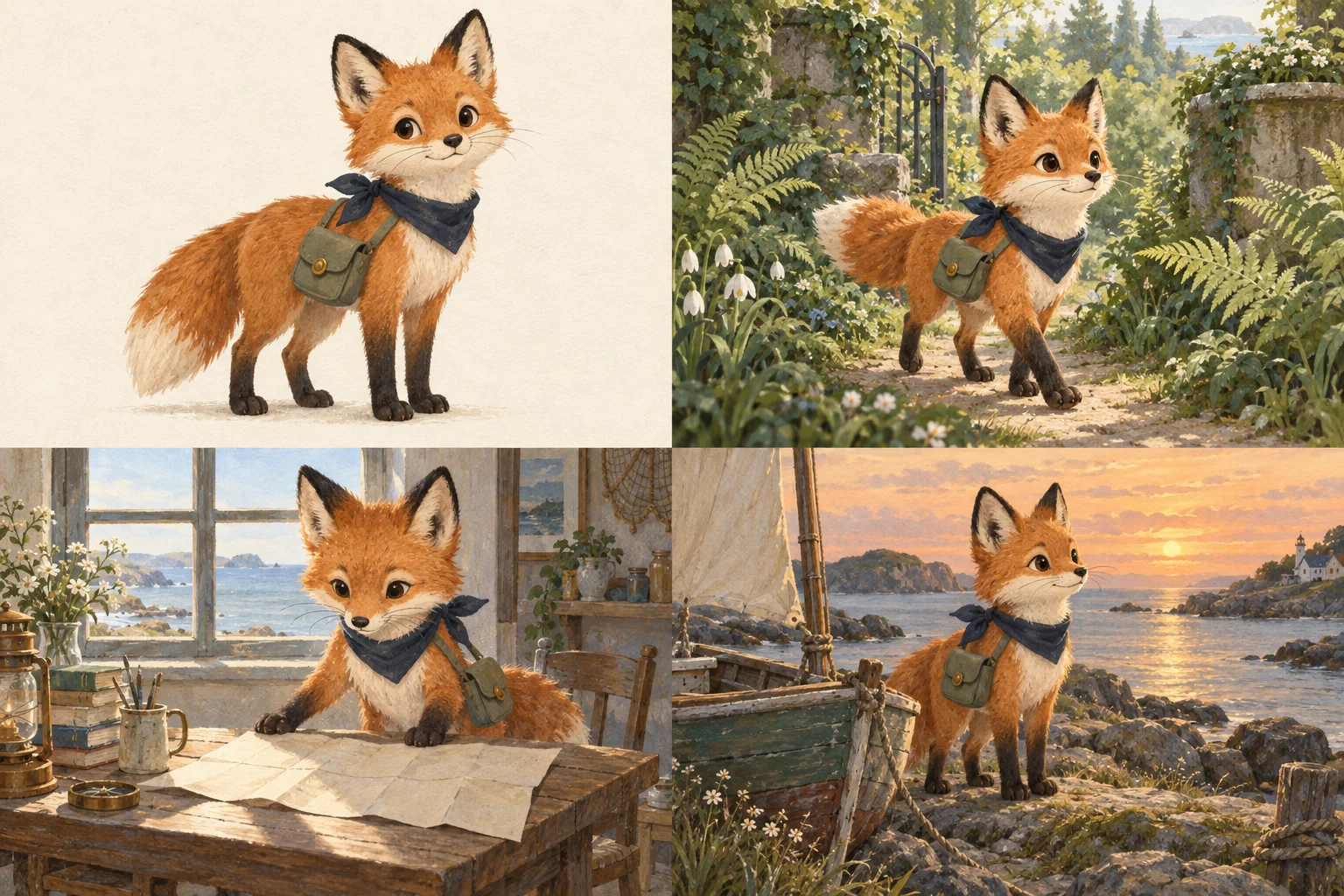
You finally have an image that looks like the character you imagined. Then you ask for a different scene. The face changes, the jacket becomes another color, or the illustration suddenly looks like it belongs in a different story. You can spend an afternoon generating attractive pictures and still have nothing that works together.
The practical way forward is to choose a reference, define the details that make the character recognizable, and develop new scenes through editing and review. If you are working on a story, presentation, or creative business in Naples, this is a useful point to bring in hands-on help: you have a vision and examples, but the production process needs work.
Why a detailed prompt does not lock the character in place
A description such as ‘friendly explorer in a yellow coat’ leaves many possible faces, proportions, and drawing styles. Reusing those words gives the next image a description to interpret. It does not give you the same control as moving a fixed character model into a new scene.
OpenAI’s image-generation documentation explicitly identifies recurring-character and brand consistency across generations as a remaining limitation. It also documents image inputs and iterative editing. Those capabilities make a reference-led process possible, but they do not guarantee that every feature will survive every change.
Changing the angle, lighting, clothing, and art style at once also makes it harder to identify what went wrong. A longer prompt can clarify a decision. It cannot replace an approved visual reference or your judgment about whether the result still looks right.
Start with a reference you actually want to keep
Choose one image as the starting reference. Before making more scenes, check its face, silhouette, colors, clothing, and overall style. Correct a feature you already dislike now; otherwise you will be comparing future images against a design you never fully approved.
For a fictional example, imagine an original garden-guide character called Juniper: round glasses, a short green jacket, a copper watering can, and soft pencil-like outlines. This is an invented teaching example. The task is to keep those recognizable features while showing Juniper planting seeds, reading a map, and greeting a visitor.
- Identity: What makes the face or silhouette recognizable, even at a small size?
- Fixed design details: Which glasses, clothing, colors, accessories, and proportions belong to the character?
- Visual style: What line weight, texture, shading, and level of detail should stay consistent?
- Allowed variation: What may change between scenes, such as expression, pose, weather, or background?
Save the reference and those decisions together. If you later approve a side view or a different expression, add it to the reference set after checking that it agrees with the original. Several conflicting references create another problem rather than solving the first one.
Edit from the reference and change one thing at a time
When your tool supports image input or editing, supply the approved image instead of relying on text alone. Describe both what should change and what should remain. Begin with a straightforward scene so you can see how well the process preserves the design before attempting a crowded composition.
Example editing instruction: Use this approved Juniper reference. Show Juniper planting seeds in a raised garden bed. Keep the face, round glasses, short green jacket, copper watering can, proportions, and pencil-like style. Change the pose and background. Leave space above the scene for a heading.
That instruction is a starting point for review, not a promise of an exact result. If the face works but the glasses change, ask for a focused correction instead of requesting an entirely different illustration. Keep the previous approved version so an unsuccessful edit does not become your new starting point.
OpenAI’s guidance for images in ChatGPT describes editing images and selecting areas to change. It also notes that edits may extend beyond the selected area. After a local correction, inspect the whole picture again, including features you did not ask to change.
Review the set together, not one attractive image at a time
Put the reference and proposed scenes beside each other. At the size your audience will see them, ask whether the same character is immediately recognizable. A beautiful image can still be the wrong image for the series.
The original fox illustration above makes this review concrete. Its orange fur, navy scarf, green satchel, and painterly style connect the four panels, but the satchel placement and strap deserve a closer comparison. Decide whether that variation fits your design rules before approving the set. This teaching illustration shows why a review matters; it is not a client result or a guarantee of identical details.
- Compare face shape, proportions, glasses, clothing, accessories, and palette against the reference.
- Check that the drawing style and level of detail belong to the same project.
- Inspect hands, props, background details, and any unexpected text before approving a scene.
- Mark each image as approved, revise, or set aside, and write the specific reason.
Keep revision notes concrete: ‘The jacket is too long’ gives someone a useful next action. ‘It feels off’ may be true, but it needs a comparison before it becomes a correction. Some pictures will need conventional retouching, compositing, or an illustrator’s work. For exact repetition, a reusable drawn asset or a rigged character may be more suitable than generating each appearance.
Give the project a place to live
Once images accumulate, finding the approved version becomes part of the work. Start with a shared folder and a simple review board: reference, scenes awaiting review, approved images, and requested changes. Keep the tool, instructions, and source reference associated with each useful result.
If your project needs more, a custom workspace can bring that review into one screen: select a scene, compare it with the reference, leave a note, and see its status. It can be designed for your computer or a supported tablet. Explore an illustrative project experience to see how organizing and reviewing an idea can feel. The interface helps you make decisions; it does not guarantee the image generator’s output.
What hands-on help should produce
A useful first engagement has something you can inspect: an approved reference, a small reviewed scene set, the design rules, and a repeatable way to request changes. Agree on the number of scenes, review rounds, file formats, usage permissions, account ownership, and any continuing tool costs before work begins. Use original or licensed references and obtain permission for identifiable people or client material.
At AI Dream Builders, you work directly with Zechariah in Naples to decide what your project needs and build it with you. Read about Zechariah’s approach and inspect the work and project status. You remain the person deciding what fits your vision.
If your images keep changing and your project is stalled, talk with Zechariah about the result you want. A short description of the idea, what you have tried, and the detail you cannot get right is enough to begin. We can discuss a defined first result and a written scope before you choose paid work.
Sources and local context
- Image generation: references, editing, and consistency limitations — OpenAI
- Images in ChatGPT — OpenAI Help Center